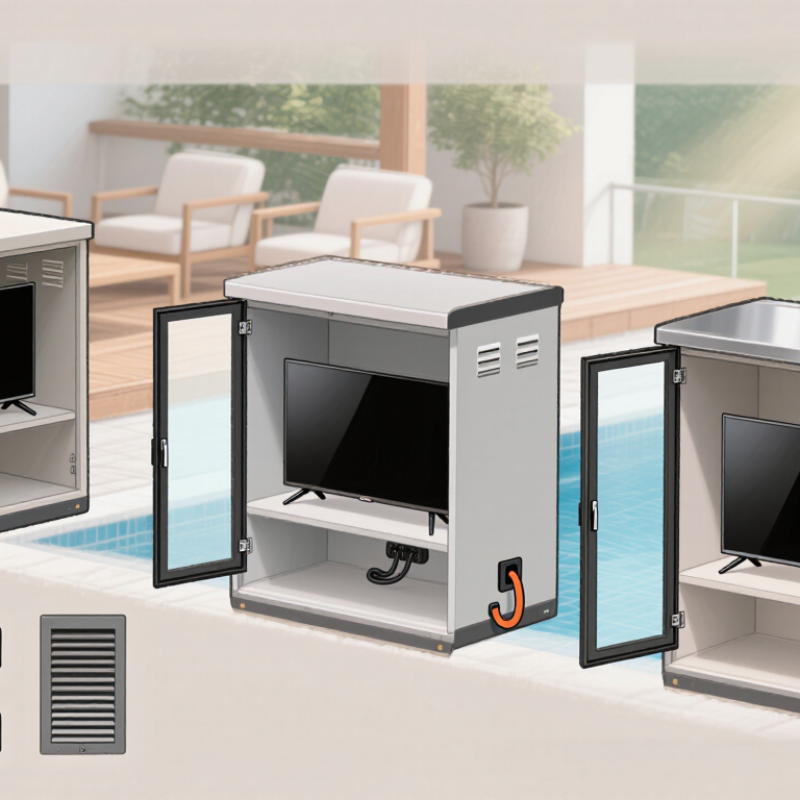
Choosing the best TV enclosure cabinet in 2026 means looking beyond appearance. The right choice should protect your television while keeping the screen usable and accessible. A Tv Enclosure Cabinet may sit on a sheltered patio, beside a pool, or in a bright outdoor lounge. Each setting brings different challenges, from rain and dust to glare and heat.
Start with the television’s exact dimensions, then check the cabinet’s usable interior space. A close fit can complicate installation and restrict airflow. Heat needs an exit. Look for ventilation designed for the cabinet, plus clear guidance on compatible screen sizes and mounting options. Check the manufacturer’s stated weather protection rather than assuming every outdoor cabinet offers the same coverage. Seals, drainage, door closures, and cable entry points deserve a careful look.
Visibility matters, too. A cabinet that protects well but reflects the afternoon sun may disappoint during everyday viewing. Consider screen position, door design, and whether the installation allows comfortable access to controls and connections. Small details count. Materials and finishes also affect maintenance, especially in humid or coastal locations. No cabinet is perfect, and stronger protection can mean added weight, cost, or less convenient access. That trade-off is easy to overlook. This guide compares the practical features that matter most, helping you match a cabinet to your television, location, and budget without relying on vague promises.
A TV enclosure cabinet is a protective housing built around a television. It helps shield the screen from dust, bumps, moisture, or changing temperatures. The exact protection depends on its design. Some cabinets suit indoor areas, while others are made for patios or workshops. A clear front panel lets viewers watch without exposing the screen directly. The cabinet may also include a lock, cable openings, and ventilation paths.
The enclosure works by creating a barrier while allowing the television to operate. Vents or quiet fans move warm air away from the screen and electronics. In harsher settings, seals help limit moisture and dust, but they do not make every cabinet fully weatherproof. Check the stated protection rating, screen dimensions, mounting capacity, and operating temperature range. A snug fit matters. Too little airflow can lead to overheating, even when the cabinet looks sturdy.
Tips: Measure the TV, including its depth and cables, before choosing a cabinet. Leave room for airflow and easy access to ports. In a sunny spot, check how the front panel handles glare; a cabinet can protect the screen yet make viewing less comfortable. Follow the maker’s installation and cleaning instructions. A small detail, but easy to overlook.
TV enclosure cabinets generally fall into four practical types. Furniture-style cabinets conceal screens in living rooms, while recessed enclosures sit nearly flush with a wall. Mobile cabinets use wheels for classrooms or meeting rooms. Outdoor units combine seals, drainage, and managed airflow to protect displays from weather. A sealed box alone is not enough; trapped heat can damage equipment.
Commercial audiovisual investment is growing. AVIXA’s 2024 Industry Outlook and Trends Analysis projects global professional audiovisual revenue will reach about $325 billion by 2029. The report does not measure enclosure sales directly, but it points to expanding use of displays in workplaces and public venues. Choose based on location, screen size, service access, and ventilation—not appearance alone. A cabinet that looks right may still make cable repairs awkward.
Tips: For outdoor use, compare the enclosure’s stated ingress rating and temperature range with conditions at the site. Measure the screen, plugs, and cable clearance. Leave space for airflow. Maintenance access is easy to underestimate, especially in a tight installation.
A TV enclosure cabinet must protect the screen without making it harder to watch. For outdoor or damp locations, check the cabinet’s IP rating rather than relying on words like “weather-resistant.” IEC 60529 defines how enclosures are tested for dust and water ingress. The rating matters, but so do sealed cable entries, corrosion-resistant hardware, and drainage. A poorly placed opening can still let wind-driven rain reach the screen.
Viewing quality depends on more than screen size. Measure the cabinet’s position from the main seat, then check for reflections on its door or protective panel. Tinted covers may reduce glare, but they can also dim the image. Ventilation is just as important: enclosed electronics can trap heat, especially in direct sun. For everyday use, make sure doors open fully and cables remain accessible. Deloitte’s 2024 Digital Media Trends survey reported an average of four paid streaming subscriptions among surveyed U.S. consumers, so simple access to ports and controls can save repeated cabinet adjustments.
Tips: Check the screen’s clearance, ventilation path, and cable reach before installation. Then test the view at midday, not only in evening light. No cabinet is perfect; even a well-built one may need repositioning after the first sunny week.
| Feature | What to Check | Protection Impact | Viewing and Usability Impact | Practical Selection Guide |
|---|---|---|---|---|
| Ingress protection (IP) rating | Look for an IP rating tested for the complete enclosure, including its door, seals, cable entries, and installed accessories. | Under IEC 60529, IP65 indicates dust-tight protection and protection against water jets; IP66 indicates protection against more powerful water jets. These ratings do not mean the cabinet is suitable for immersion. | More robust sealing can limit ventilation, so check how the design manages heat from the TV. | Match the rating to the actual exposure. Confirm that the rating applies to the fully assembled configuration, not just an individual component. |
| Impact resistance | Check whether an IK rating is specified for the enclosure or its viewing panel. | Under IEC 62262, IK08 corresponds to impact energy of 5 joules and IK10 to 20 joules. A rating applies only to the tested construction. | A stronger panel may be heavier or affect optical clarity; inspect the screen area as well as the cabinet frame. | Choose a documented impact rating where accidental knocks or tampering are realistic risks. Do not assume a metal housing means the window has the same protection. |
| Weather-resistant materials | Review the housing material, corrosion-resistant finishes, fasteners, seals, and drainage details. | Materials and well-designed joints help resist corrosion, moisture, and prolonged outdoor exposure. | Discoloration, fogging, or seal deterioration can reduce the quality of the viewing experience over time. | For outdoor installation, verify suitability for the local climate and follow the maintenance instructions for seals and finishes. |
| Viewing-window clarity | Check the window material, visible distortion, glare, and compatibility with the TV’s display area. | A sealed window helps separate the TV from dust and moisture, but it must remain intact and properly fitted. | Optical clarity and low reflections make the picture easier to see. A window can add reflections or reduce perceived contrast, especially in bright locations. | Compare the cabinet under the lighting conditions where it will be used. Confirm that the window covers the screen without obscuring sensors or controls. |
| Heat management | Look for a stated operating temperature range, ventilation design, and any temperature-monitoring or cooling provisions. | Keeping the TV within its specified operating conditions helps avoid heat-related shutdowns or damage. | Overheating can interrupt viewing and shorten equipment life. Fans may require power and periodic cleaning. | Use the TV manufacturer’s temperature and clearance guidance. Do not assume a sealed cabinet can safely operate without a suitable heat-management plan. |
| Ventilation and airflow | Check where air enters and exits, whether openings are protected, and whether airflow paths match the intended installation. | Protected vents can help balance airflow with resistance to dust or water entry; ventilation openings may affect the enclosure’s overall protection rating. | Clear airflow supports reliable operation, while poorly placed vents can admit contaminants or create fan noise. | Confirm that the enclosure’s tested rating remains valid with the specified vents, filters, and accessories installed. |
| TV fit and internal clearance | Compare the cabinet’s usable internal width, height, depth, and mounting pattern with the TV’s dimensions. | Correct fit helps prevent pressure on the screen and keeps seals and doors from interfering with the television. | A secure mount and adequate clearance make installation, cable connection, and servicing easier. | Measure the TV itself, including its stand or protruding connectors where relevant. Follow both the TV and enclosure clearance requirements. |
| Mounting and structural support | Check the approved mounting method, load capacity, attachment hardware, and suitability of the wall or stand. | Secure mounting reduces the risk of the cabinet shifting or falling, including in exposed locations. | A stable installation supports comfortable viewing and helps keep the screen correctly positioned. | Verify the combined weight of the cabinet, TV, and accessories against the mounting system and supporting structure. |
| Access, locks, and serviceability | Inspect door opening, lock type, hinge strength, cable access, and how filters or components are serviced. | Locks can deter casual access, while secure closures help maintain the enclosure’s intended protection. | Convenient access simplifies cleaning, cable changes, and troubleshooting without unnecessarily removing the TV. | Choose access features that fit the installation and maintenance routine; confirm that servicing does not compromise seals or the stated rating. |
| Cable entry and power arrangements | Check cable-gland compatibility, entry locations, strain relief, and any electrical requirements for the installation. | Unsealed or poorly fitted cable entries can create paths for dust and water. | Well-planned routing reduces clutter and makes connections easier to inspect or replace. | Use entries and glands compatible with the cable sizes and enclosure design. Have fixed electrical work completed according to local regulations. |
| Screen size and viewing position | Confirm the cabinet supports the TV’s actual dimensions and can be positioned for the intended audience. | Correct sizing avoids forcing an oversized TV into a cabinet or leaving the screen poorly protected. | Viewing distance, screen height, and viewing angle affect comfort; the cabinet window should not obstruct the full display. | Plan the screen position from the normal seating or standing area rather than choosing by diagonal screen size alone. |
| Documentation and testing | Look for clear installation instructions, test reports or certification details, limitations, and maintenance guidance. | Documentation helps confirm what was tested and which conditions or configurations are covered. | Clear instructions make setup and ongoing care more predictable. | Prefer specific, verifiable ratings and stated limits over broad claims such as “weatherproof” without supporting details. |
Selection note: The best cabinet depends on the installation environment, TV specifications, and required access. IP and IK ratings describe specific test conditions; they do not guarantee suitability for every climate, mounting arrangement, or use case.
The best TV enclosure cabinet in 2026 is the one that fits your screen, room, and daily routine. Measure the television’s width, height, and depth, including its stand or wall-mount hardware. Leave clearance around the screen and ventilation openings so heat can escape. Measure twice. A cabinet that looks spacious in a showroom may feel cramped against your actual wall.
Tips: Check the cabinet’s internal dimensions, cable openings, and ventilation path before buying. Place a small fan or receiver inside only if the design allows airflow. Keep doors easy to open, and make sure the screen remains visible from your usual seats.
Your environment matters as much as screen size. In a bright room, consider reflective glass and whether cabinet doors create glare. In a busy household, sturdy materials and secure mounting may be more useful than decorative details. Small details matter. Think about where power outlets sit and how cables will reach them without pinching. I would not rely on appearance alone; even a well-finished cabinet can be inconvenient if it blocks controls or traps heat. Decide what must be stored inside, then choose a layout that leaves enough room for both equipment and airflow.
The best cabinet depends on where the television will sit and what it must withstand. For outdoor use, compare the enclosure’s tested IP rating, seals, and resistance to corrosion. A rating is useful only when it comes from a clear test specification. Check the screen’s exact dimensions, including its depth and mounting points. Measure twice.
Heat matters, too. Look for ventilation designed to manage heat without letting rain or dust reach the screen. Compare how the cabinet opens, whether one person can safely service it, and where cables enter. A tight fit can look neat but leave little room for airflow or repairs.
AVIXA’s 2024 Industry Outlook and Trends Analysis projected global professional AV revenue could reach $325 billion by 2028. That growth makes durable installation choices worth careful comparison, though the figure is not specific to TV enclosures. Tips: Ask for documented environmental and temperature test results, not just phrases like “weatherproof.” Check the warranty conditions and inspect hinges, locks, and seals. I would still verify the fit in person; product diagrams can miss awkward cable bends.